How to Optimize Purchase Order Processing for Speed & Control

How to Optimize Purchase Order Processing for Speed & Control
If your AP team is chasing missing POs, resolving invoice discrepancies, or cleaning up purchasing errors at month-end, the root cause may not be accounts payable at all. In many cases, it starts with a purchase order process that lacks the speed, structure, and controls needed to keep purchasing on track.
Purchase order processing moves a purchase from request through approval, ordering, invoicing, and recordkeeping. When that workflow relies on manual steps, the result is often delayed approvals, duplicate orders, budget surprises, and more downstream work for finance.
This guide breaks down the full purchase order processing workflow, the most common points of failure, and the controls and software features that help teams improve efficiency without losing visibility or compliance.
Purchase order processing key takeaways
- Purchase order processing creates an audit trail that supports compliance, budget control, and vendor accountability.
- Manual workflows can introduce errors that cascade downstream—duplicate orders, missed approvals, and invoice mismatches—delaying payments and straining vendor relationships.
- A well-documented procurement process with clear approval hierarchies and preferred vendor networks reduces friction and improves purchasing efficiency.
- Effective exception handling helps teams catch price mismatches, missing receipts, and duplicate invoices before they become expensive problems.
- Automation software like Order.co enables control at the point of purchase, reducing AP workload and improving close speed.
Download the free tool: Purchase Order Template
How to build a purchase order processing workflow (step by step)
Understanding each step in the purchase order processing workflow helps you spot where delays happen, where errors creep in, and where time-consuming manual tasks slow your team down.
When you can see the full process clearly, you know exactly where to focus improvement efforts, whether that's tightening approval rules, automating three-way matching, or building better vendor relationships. Most teams follow a version of this workflow, though the specifics vary based on company size, industry, and system maturity.
Step 1. Identify needed items
Research and select the necessary supplies from new or existing vendors. Start by reviewing product information and comparing costs across suppliers to evaluate similar options and identify the best value.
Use your procurement policy to guide decisions and ensure compliance, and involve department leaders to assess and prioritize needs based on operational requirements and budget constraints. Well-documented policies increase compliance with internal and external requirements, while procurement software improves collaboration and speeds up decision-making.
Step 2. Create a purchase requisition for the items
Complete a purchase requisition that includes all required vendor information, supporting documentation approvers need to move the purchase forward, and clear approval roles to eliminate confusion about who reviews what. A documented approval process with designated interdepartmental approvers results in faster transaction timelines and fewer mistakes.
Step 3. Submit the purchase requisition for approval
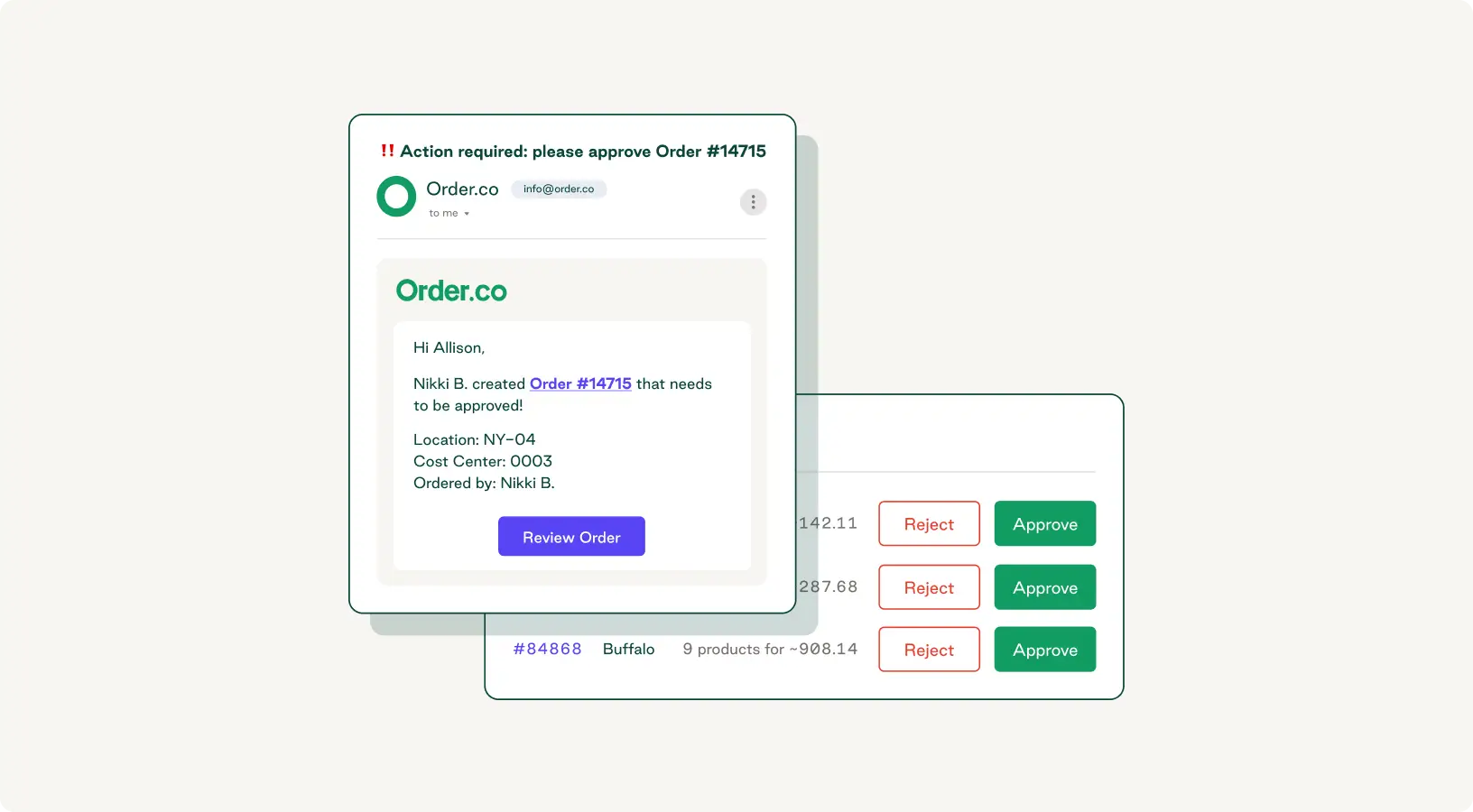
Submit the order request to the first approver—usually a direct manager or department head. The approval workflow typically includes an initial review against department or project budget, routing through additional approvers (IT, legal, security, or finance) based on purchase type, and spending threshold checks that trigger executive approval for high-value contracts. Include these thresholds in your approval rules and communicate them clearly so everyone understands the process.
Step 4. Create an approved purchase order
Once the requisition clears all required approvals, the procurement or finance team converts it into a formal purchase order: a legally binding document that commits your organization to the purchase.
At a minimum, every PO should contain:
- Purchase order number, date, and time of issuance
- Requestor's name and department
- Vendor details (name, address, contact information)
- Description of goods or services, including quantity ordered, unit price per item, total price, and any applicable taxes and fees
- Shipping and delivery instructions (including costs)
- Billing instructions, payment terms, and net due date.
Missing or incorrect information creates friction during receiving, invoice matching, and payment. Manual purchase order creation introduces unnecessary risk: incorrect quantities lead to excess inventory, incorrect pricing results in payment disputes, and missed delivery dates delay projects.
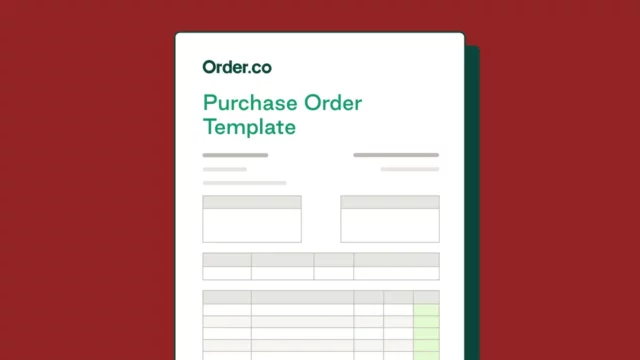
Purchase order templates standardize what you capture, but manual data entry still leaves you at risk. Purchase order automation removes that variable—approved requisition data flows directly into the purchase order, no re-entry required.
Purchase Order Template
Download our free purchase order template to help ensure you capture all key order details and maintain consistency across every PO.
Step 5. Approve and submit the purchase order
The procurement, accounting, or finance team conducts a final review before sending the PO to the vendor. At this point, the PO becomes an open purchase order, issued but not yet fulfilled. The supplier then typically:
- Reviews the order and confirms item availability
- Contacts your team with any questions
- Provides an estimated delivery date and tracking number
- Offers replacements or updated timelines if items are unavailable
Step 6. Receive and reconcile goods
When the order arrives, inspect it to confirm all items are present and in good condition. Your receiving process should include the following:
- Verifying quantities match the PO
- Checking for damage or defects
- Contacting the vendor immediately if anything is missing, incorrect, or damaged
- Creating a receiving record that notes any delivery exceptions or compliance issues
Once you've documented receipt and verified the delivery, the accounting team can begin matching the transaction against your financial records.
Step 7. Complete three-way matching and invoice verification
The accounting team performs a three-way match by comparing the purchase order against the receiving record and vendor invoice. This confirms consistency in pricing, payment terms, and quantities. To avoid expensive mistakes, investigate and resolve any discrepancies before processing payment.
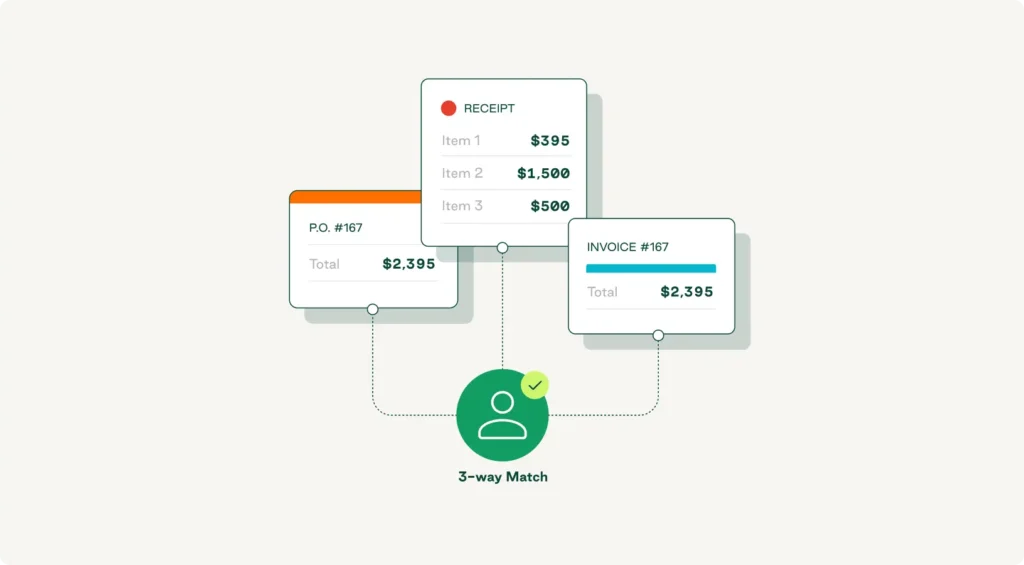
While essential, this step can be tedious and error-prone. A centralized procurement platform reduces manual work, improves document alignment, and helps your team complete verifications faster.
Step 8. Process payment and close purchase order
After a successful three-way match, your accounts payable team processes payment following the agreed-upon terms via ACH transfer, check, credit card, or another approved method.
Timing is important. Paying too early ties up working capital. Paying late can damage vendor relationships and may incur fees. A well-designed system tracks payment terms automatically and flags early-payment discount opportunities before they expire.
Once payment clears, mark the PO as closed to keep your procurement records clean.
Step 9. Ensure accurate record-keeping
Keep detailed records of all related activity in a centralized location your team can access for internal reviews or external audits—including requisitions, approvals, purchase orders, delivery receipts, invoices, and payment confirmations.
Accurate record-keeping supports compliance, reduces risk, and gives you the data you need to analyze spending patterns over time. A centralized purchase order management system automatically organizes all transaction data in one place, so you always have a complete audit trail ready when you need it.
Step 10. Review supplier performance
Collect feedback from stakeholders about the vendor's delivery.
Track key metrics such as:
- On-time delivery rates
- Order accuracy
- Invoice discrepancies
- Responsiveness to issues
- Quality of goods or services
When you document this data consistently, patterns emerge that wouldn't be obvious from a single transaction. Performance reviews create accountability. For example, vendors who know you're tracking results are more likely to maintain high standards. Your procurement team can use this information to improve future purchasing decisions, strengthen supplier relationships, and refine the overall procurement process.
This workflow is meant to create control and visibility, but when managed manually, these same steps can introduce bottlenecks, inaccuracies, and extra work for procurement, AP, and finance.
What are the challenges of manual purchase order processing?
Manual PO processing doesn't just slow you down—it creates problems that compound through every step downstream. The most common challenges include:
- Errors and delays: Manual data entry increases the risk of mistakes, such as duplicate orders, incorrect quantities, and misfiled documents. These errors delay procurement and disrupt operations.
- Gaps in compliance and audit readiness: Managing documentation by hand makes it harder to meet audit requirements. Without a centralized digital record, tracking actions and generating compliance reports becomes difficult.
- Higher costs: Inefficient manual workflows lead to missed early payment discounts, late fees, and unnecessary purchases. A missed approval can bypass budget controls entirely, and finance may not catch the overrun until month-end close.
- Difficulty scaling: As your business grows, manual processes become harder to manage. Automated software makes it easier to handle higher-order volumes and maintain spending control as your organization grows.
- Limited visibility and reporting: Tracking orders in spreadsheets makes it nearly impossible to access real-time data. Without clear insights, you might miss duplicate purchases, exceed budgets, or overlook vendor performance issues.
The rework these issues create adds up fast. When invoices arrive without matching POs, AP teams may spend hours tracking down the original requester to verify the purchase, time that compounds across hundreds of transactions.
Combining automation with best practices eliminates these bottlenecks and builds a more scalable purchase order system.
How does automating the purchase order process benefit procurement teams?
Manual purchase order processing forces teams to choose between speed and compliance. Paper requisitions, email approvals, and manual PO creation drive workarounds that cause downstream chaos, including duplicate invoices, budget overruns, and reconciliation problems that take weeks to untangle.
Purchase order automation embeds controls directly into the purchasing workflow, preventing problems at the moment of purchase.
Key benefits include:
- Better cost savings: Prevent missed payments, overcharges, and invoice discrepancies with full visibility into procurement spend.
- Greater accuracy: Eliminate human error in invoice reconciliation, payment processing, and PO matching—ensuring every transaction is accurate and auditable.
- Reduced manual entry: Remove tedious manual steps that lead to processing exceptions and misapplied payments.
- Enhanced reporting: Generate reports on spending patterns that inform future decisions, benchmark pricing, and strengthen supplier relationships.
- Reduced risk: Apply user access controls, track activity, and enforce approval rules to prevent unauthorized payments.
- Stronger supplier relationships: Use performance data to negotiate better deals and build long-term partnerships.
This shift from reactive cleanup to proactive control changes how procurement and finance work together. Finance gets real-time visibility into committed spend. Procurement enforces policies without creating bottlenecks. And AP spends less time chasing documentation.
What controls prevent errors and delays in purchase order processing?
Exceptions don't announce themselves. Price mismatches, missing receipts, and duplicate invoices surface quietly, and by the time AP finds them, the damage is already done. The right controls catch these issues before they become expensive.
Exception handling for price and quantity mismatches
Price and quantity mismatches between POs, receipts, and invoices are among the most common exceptions procurement teams encounter. Without automated matching, these discrepancies go unnoticed until AP manually reviews the invoice—often weeks after delivery.
Automated three-way matching flags exceptions immediately. When an invoice doesn't align with the PO or receiving record, the system holds it for review instead of routing it for payment, giving procurement time to resolve disputes before cutting a checkwhile creating a clear audit trail.
Managing missing receipts and duplicate invoices
Missing receipts and duplicate invoices create different problems but require similar controls. Without a centralized system to track invoice status, AP can't complete three-way matching, vendors chase payments, and duplicate invoices risk overpayment.
Automated invoice management prevents these issues by tracking receipt status in real time and comparing incoming invoices against historical records to flag potential duplicates before payment.
Purchase Order Template
Get our purchase order template to establish a repeatable, reliable process for managing orders.
"*" indicates required fields
Best practices for efficient purchase order processing
To get the most out of your purchase order system, you need to be realistic with the day-to-day operational challenges of procurement. These steps can help you reduce risk, improve efficiency, and increase savings.
Build a documented procurement process
Without clear guidelines, teams default to workarounds that create downstream chaos, such as duplicate orders, budget overruns, and invoice mismatches. Define who can buy what, when, and from whom by documenting:
- Spending thresholds that trigger additional reviews
- Approval hierarchies by department or purchase type
- Vendor requirements for new suppliers
Enforce policies at the point of purchase, not after the fact. PO management tools like Order.co embed your documented process directly into the buying workflow, applying spend limits, automatically routing approvals, and flagging exceptions before they become problems.
Create a departmental approval roster
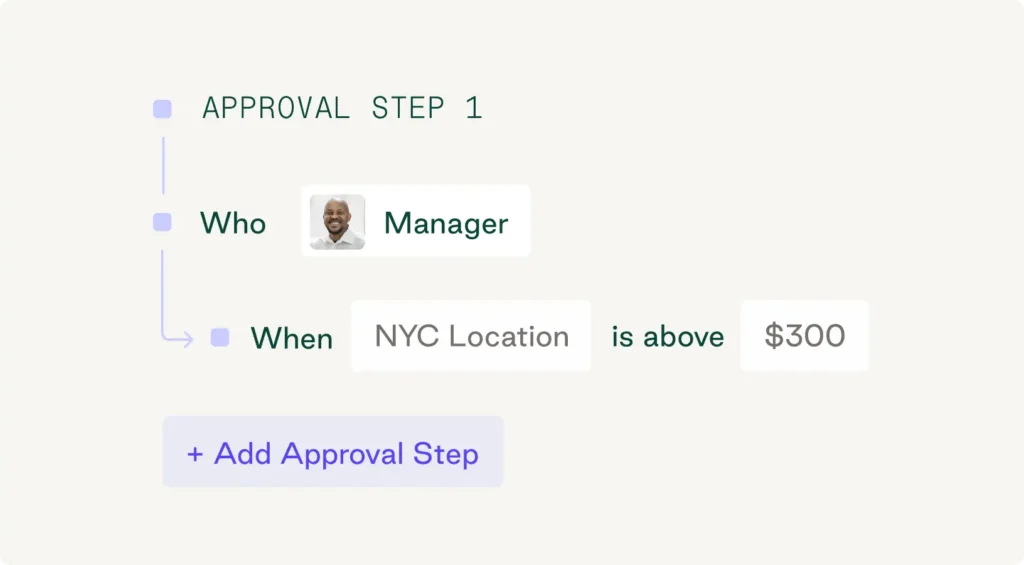
Approval rosters define who has the authority to approve purchases at each organizational level. Without one, requests stall and finance loses visibility. Map out exactly who approves what, for example:
- Department heads: purchases up to $5,000
- Finance directors: $5,000 to $25,000
- Executive sign-off: contracts exceeding $25,000
- Departmental nuances: IT security reviews, legal compliance sign-offs
Modern procurement platforms like Order.co automate approval routing based on these rosters, removing manual coordination that slows down purchase order processing.
Establish a preferred vendor network
A preferred vendor network is a shortlist of pre-approved partners that increases efficiency, reduces third-party risk, and gives you bargaining power for better pricing and terms. Working with known suppliers means you already understand their delivery timelines and product quality, which speeds up approvals and minimizes invoice discrepancies.
A centralized procurement platform like Order.co makes it simple to manage and enforce preferred vendor networks by surfacing approved suppliers during the requisition process.
Use strategic sourcing methods
Strategic sourcing takes a data-driven approach to purchasing by analyzing market trends and segmenting suppliers to optimize pricing and quality. Treat vendor selection as a continuous process, regularly reviewing supplier performance, comparing pricing against market benchmarks, and adjusting your preferred vendor list based on what's working.
This approach supports long-term supplier partnerships, which are especially critical for building resilience and agility amid supply chain disruptions.
Create more efficient purchase order processing workflows with Order.co
Order.co is a comprehensive procurement software platform that unifies the end-to-end purchasing workflow, from requisition through payment and reporting.
The platform solves the core trade-off that breaks most procurement systems: the choice between speed and control. Order.co makes compliant purchasing faster than workarounds by enforcing controls at the point of purchase rather than during post-purchase cleanup.
Key features include:
- Centralized purchasing and vendor management: Manage all vendors and purchases from one platform with full visibility across departments.
- Automatic PO creation and submission: Generate accurate purchase orders from approved requisitions and automatically route them to vendors.
- Customizable approval workflows: Route orders to the right approvers based on amount, category, or location.
- Easy item selection and reordering: Shop from any vendor in one place, while Order.co captures order details and enforces purchasing rules.
- Dynamic purchasing guidelines and spend limits: Apply controls based on user, role, department, and location at the moment of purchase.
- Automatic GL coding and pre-purchase accuracy: Prevented invoice discrepancies at the source—no manual matching required.
Order.co is vendor-agnostic, so businesses can work with their own vendors or access Order.co’s network of over 40,000 suppliers—all while maintaining control and visibility across their purchasing.
Schedule a demo to see how Order.co supports purchase order processing by embedding approvals, budgets, and vendor controls directly into your workflow.
FAQs about purchase order processing
Get started
Schedule a demo to see how Order.co can simplify buying for your busines
"*" indicates required fields