Automate Your Purchase Approval Process for Faster, Controlled Buying

Automate Your Purchase Approval Process for Faster, Controlled Buying
The purchase approval process is how organizations review, authorize, and track spending before money leaves the business. When it's working well, it's nearly invisible. When it's broken, everyone feels it, from the employee waiting for order authorization to the CFO staring at unexplained line items.
The best way to eliminate that friction is to formalize these workflows. Automating your purchase approval process is a direct path to lower costs, faster operations, and better spending visibility.
Purchase approval process key takeaways
- A purchase approval process is a structured workflow that authorizes spending before a purchase order reaches a vendor.
- Approvals should trigger based on spend thresholds, category type, vendor status, and budget availability instead of dollar amount alone.
- Automated approval routing reduces manual errors, eliminates email chains, and gives finance real-time visibility into committed spend.
- Procurement software like Order.co embeds approvals directly into the purchasing workflow so controls don't slow teams down.
Download the free ebook: The Complete Guide to Approval Processes
How does the purchase approval process work in procurement?
The purchase approval process is a series of checks and authorizations that a spending request passes through before it becomes a formal purchase order. Since it sits at the beginning of the procurement cycle, it serves as a proactive control mechanism that allows procurement and finance teams to catch budget overruns, unauthorized vendors, and policy violations before they show up on invoices.
Multiple activities can trigger a purchase approval, including:
- A purchase requisition submitted by an employee or department
- A new vendor onboarding request requiring a compliance review
- A budget request for a new cost center or project
- A contract renewal or amendment above a set spend threshold
- A purchase outside of pre-approved vendor catalogs
Understanding what triggers approvals and building the right workflows for each scenario is the foundation of an effective purchase requisition approval workflow.
The Complete Guide to Approval Processes
Drive accuracy, compliance, and spend visibility with standardized approvals workflows. Download the guide to learn how to get started.
What are the necessary steps for purchase approvals?
Every approval process follows the same basic order: request, review, and approve. But in procurement, specifics like total cost or vendor type matter a great deal. For example, a high-risk purchase might require a multi-step review, while a small-dollar reorder could be completed in a single step.
Here's how each core approval step applies to purchase approvals:
- Request: An employee or department submits a purchase requisition detailing the vendor, item, quantity, estimated cost, and business justification.
- Review: The request routes to the appropriate approvers, depending on the size and nature of the purchase. Reviewers check budget availability, vendor compliance, and alignment with procurement policy.
- Approve: Approvers either authorize the request to proceed to a purchase order, request additional information, or reject it with a reason.
What is approval automation?
Approval automation is a digital process that optimizes the workflow for spending requests and invoices. It replaces manual handoff with rule-based routing to reduce paperwork, simplify communication, and track progress in real time. Beyond efficiency, it also reduces errors by enforcing a consistent sequence of checks that ensure every request or invoice is accurate and compliant before it reaches the final stage.
Types of approval processes
Understanding how purchase approvals relate to other business processes can help you design integrated workflows:
- Purchase requisitions are the most common trigger for procurement approval workflows. They initiate the purchase order processing cycle and serve as the primary control point for spending.
- Vendor onboarding approvals are a distinct but related process. Before you can send a new supplier a PO, that supplier typically needs to pass compliance checks and undergo vetting by procurement or legal. Embedding onboarding approvals into your procurement platform prevents unauthorized vendors from entering your supply base.
- Budget approvals set the spending parameters for purchase approvals. Annual budget cycles allocate funds to departments and cost centers, establishing the limits against which all subsequent requests are validated.
- Invoice approvals occur at the end of the PO processing cycle, confirming you received what you ordered and were billed correctly for it.
Why is a structured purchase approval process important for procurement teams?
Without a structured purchase approval process, organizations leave the door open to costly, avoidable problems, including:
- Rogue spending: Employees purchasing outside approved channels may choose unapproved vendors, pay above-contract rates, or code spend incorrectly. According to a recent Hackett Group study, reducing maverick buying can recover up to 60% of lost savings.
- Budget overruns: Overruns occur when requests aren't validated against available budgets in real time. By the time finance notices that a department has overspent, the purchase is already made. Effective purchase budgeting depends on approvals that include live budget checks.
- AP bottlenecks: Manual approval workflows rely on email chains and spreadsheets that stall, bury requests, and require constant follow-up. Industry benchmarks show automated technologies can deliver 82% faster invoice processing time and 78% lower invoice processing costs.
A structured purchase approval process is a proven way to reduce accounts payable costs, avoid overspending, and ensure compliant purchasing.
How to create a purchase approval process
Planning your approval steps before implementing them is worth the upfront investment. Well-designed workflows save time, reduce friction, and ensure all stakeholders understand their roles.
Define your approval hierarchy
Mapping your approval hierarchy is the first step toward a functional process. Before finalizing your policy, determine specific triggers for different levels of review:
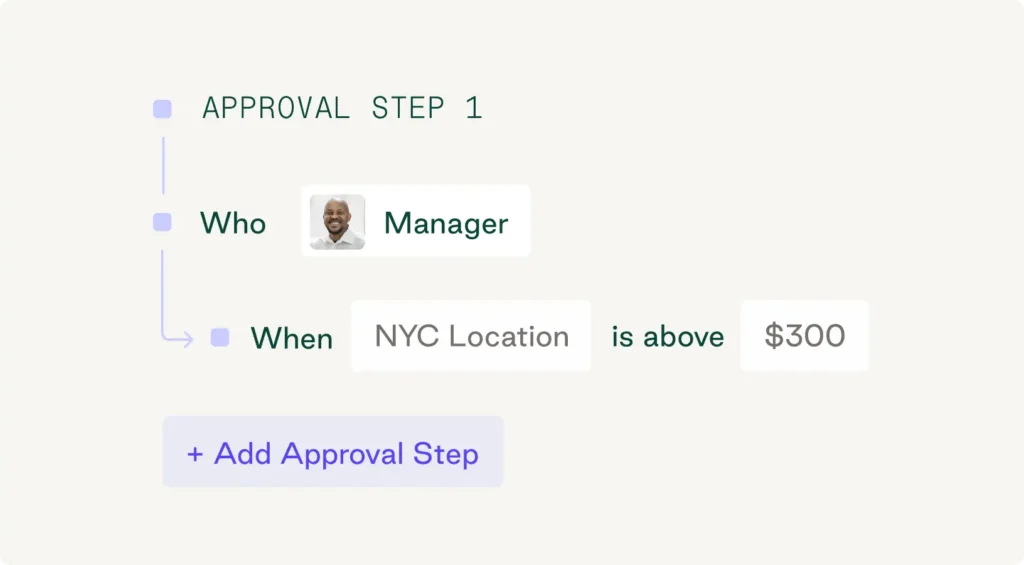
- Spend limits: Which users have purchasing privileges, and at what dollar amounts?
- Additional thresholds: What amounts require additional sign-off (e.g., $500 vs. $50,000)?
- Specialized categories: Do certain categories or new vendors always trigger compliance checks?
- Geography: Do all locations follow the same rules?
Establishing these parameters upfront provides the blueprint for your entire approval system.
Establish a list of approvers
Designating approvers, such as direct managers, department leaders, procurement, finance, or executives, ensures each request reaches the right person at the right stage. Keep approval chains proportional to the purchase: high-value contracts warrant executive review while routine supply reorders do not.
Build an approval workflow
If you're asking requestors to follow a policy, you need to provide a clear path for them to do so. Use purchase requisition software to enforce spending limits, approval routing, and permission rules automatically—turning your approval rules into a functional, repeatable process.
Create a document retention system
Every approved purchase should generate an audit trail. Implement a centralized document system to make it easy to retrieve approvals, cross-reference contracts, and support audits or financial reviews without digging through email archives.
Steps in an effective purchase approval process
A complete purchase approval workflow moves through five phases. Here's how each one works in practice, and where automation makes the biggest difference.
1. Purchase requisition
The process starts when an employee submits a purchase requisition identifying a business need. This is not a formal purchase order; it's an internal request that needs authorization before it becomes one. A complete requisition should include vendor name and address, item description, itemized costs, total price, business justification, and budget code.
2. Approvals
After submission, the request routes through your hierarchy based on configured rules—spend amount, category, department, or vendor status. Automated routing ensures the right people receive immediate notifications to approve or return requests.
3. Purchase order creation and submission
Once approved, the requisition becomes a purchase order. Purchase order creation tools automatically generate POs from approved requisitions, reducing errors and standardizing documentation before submission.
4. Fulfillment and receipt
The vendor fulfills the order, and the receiving team confirms delivery against the purchase requisition, PO, and invoice—a process called three-way matching. This ensures you only pay for what you received at the agreed-upon price.
5. Payment
With fulfillment and three-way matching complete, the invoice moves to final approval and gets scheduled for payment. Purchase order automation can handle this entire chain with minimal manual intervention.
The Complete Guide to Approval Processes
Drive accuracy, compliance, and spend visibility with standardized approvals workflows. Download the guide to learn how to get started.
"*" indicates required fields
How can procurement teams optimize and automate the purchase approval process?
Automation doesn't just speed up approvals—it makes them smarter. To improve your purchase approval workflows, implement these high-impact strategies:
- Automate routing by spend threshold: Configure rules that route requests automatically based on dollar amount, category, vendor status, or cost center.
- Validate budgets in real time: Check live budget data to see a purchase's impact ahead of time instead of discovering an overrun at month-end.
- Integrate with your ERP and accounting systems: Connect your procurement platform to your ERP or accounting software to allow approved POs and invoices to flow through automatically—eliminating manual data re-entry and the errors that come with it.
- Implement exception-based review: Hand routine purchases over to automation so approvers can focus on exceptions like new vendors, high-value contracts, and off-policy requests where human judgment adds real value.
- Leverage AI-driven approval workflows: Apply configurable rules and use historical data to flag unusual or potentially problematic orders for review before they're even submitted, reducing exceptions and keeping spend on policy.
For example, Fitness Formula Clubs (FFC) uses Order.co's intelligent workflows to handle purchasing across its 11 locations. According to Procurement Manager Lucky Weeras, the platform's AI insights for approval requests provide crucial guidance—flagging compliance issues before they create an "avalanche effect" and helping the operations team track order timing and demand variations to support FFC's just-in-time purchasing approach.
Using procurement software and digital tools for purchase approvals
Modern procurement software doesn't treat approvals as a separate, bolt-on process. Instead, it embeds approvals directly into the purchasing workflow so controls don't require employees to leave the platform, chase down approvers, or submit requests through a separate system.
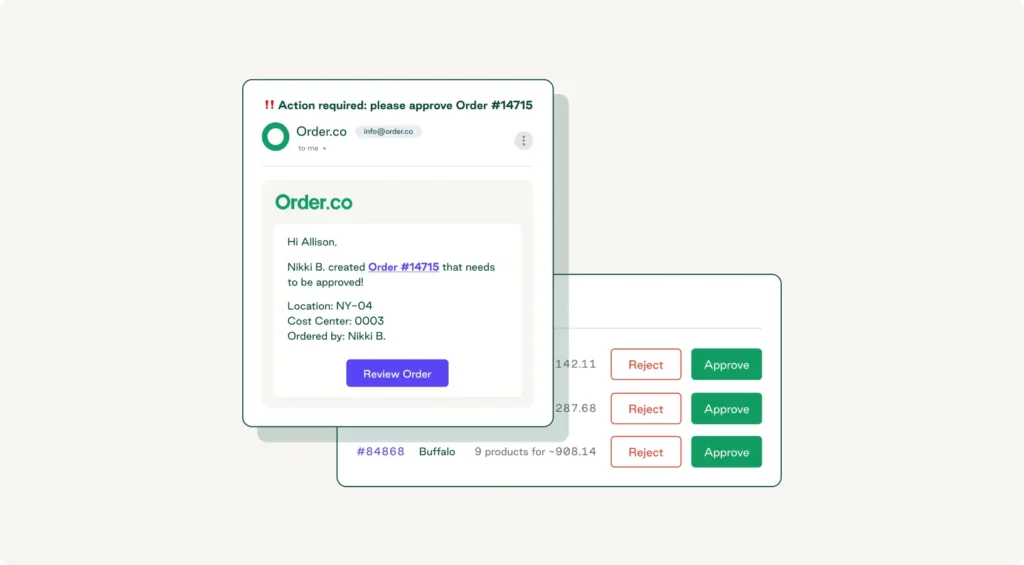
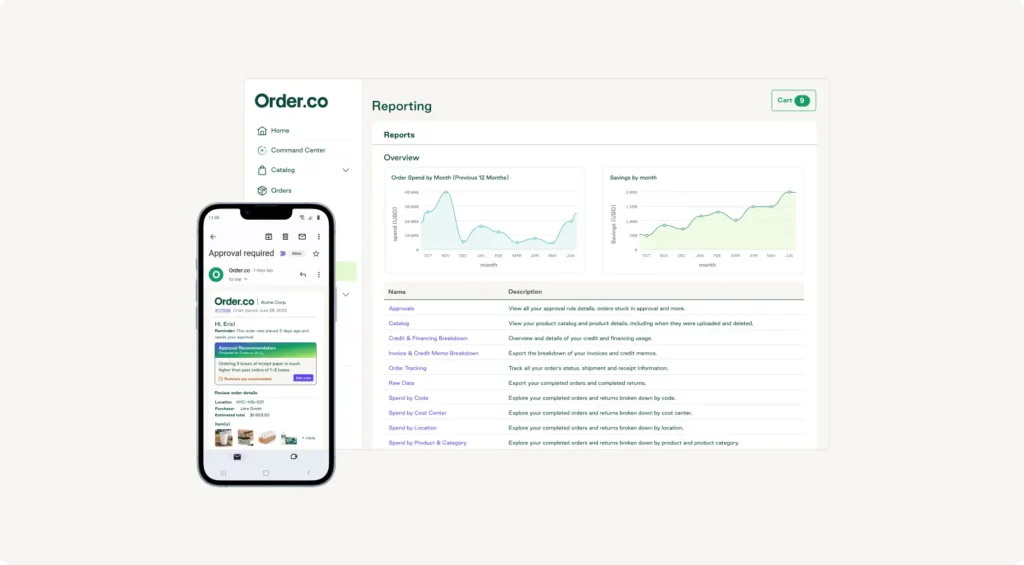
When a user selects an item or vendor, the platform triggers the approval workflow automatically based on the rules you've set. Approvers receive an immediate notification with all necessary context to approve, reject, or edit at the line level without back-and-forth communication. The result is a process that's both controlled and fast enough that buyers actually follow it.
Enforce control without slowing approval workflows with Order.co
A better purchase approval process isn't just about fewer headaches—it's a competitive advantage. Companies that commit to it move faster and spend smarter.
Order.co gives buyers the flexibility to move quickly and managers the visibility to stay in control, eliminating the friction that makes people work around the system.
With Order.co, you get:
- Automated approvals: Route requests by GL code, user, vendor, location, order subtotal, or cost center.
- AI-powered intelligence: Automatically flag anomalies and suggest actions to simplify decision-making.
- Line-level editing: Avoid back-and-forth delays by editing purchase requests directly.
- Centralized requests: Prevent logjams with integrated notifications and alerts.
Schedule a demo today to see how Order.co enforces spend control at the moment of purchase—without slowing you down.
FAQs about the purchase approval process
The key is embedding approval rules directly into the purchasing workflow. Order.co allows you to configure auto-approvals for low-risk, on-catalog purchases from approved vendors and reserve human review for exceptions like new vendors, high spend, or off-policy categories.
Purchase approval should trigger when spend exceeds a defined threshold, when a request involves a new or unapproved vendor, when a purchase is outside of pre-approved catalogs, a budget request for a new project, or when a contract renewal crosses a set value. The trigger determines the routing—automated rules ensure the right workflow fires every time.
Approval thresholds define where each authorization level kicks in, shaping the speed and direction of the workflow. Well-designed thresholds let routine, low-value purchases move quickly—sometimes without any human approval—while flagging high-risk requests for additional review. Thresholds should account for category risk, not just dollar amount.
Get started
Schedule a demo to see how Order.co can simplify buying for your business.
"*" indicates required fields